
Text Parsers (Text Parsing Expressions)
Text Parsers extract named variables from incoming text logs and text messages so they can be filtered, correlated, and evaluated in alerting rules.
Purpose and Scope
Text Parsers are designed for parsing textual input, such as logs or external text messages, and transforming them into a set of named variables (key value pairs).
These variables can then be: - used in filters - referenced in alert conditions - evaluated as counters or status-like values
Text Parsers do not generate counters or status objects directly.
Their sole output is a list of extracted variables.
Parser Categories in UI
In the NetCrunch UI, Text Parsers are organized into two independent sections:
-
Text Log Parsers
Used for parsing log entries coming from log monitoring sources. -
Text Message Parsers
Used for parsing externally received text messages, such as emails or custom text inputs.
Both categories work identically in terms of parsing logic and outputs, but are applied to different data sources.
This is fundamentally different from Data Parsers, which process structured external data and output counters and status objects. Data Parsers are described separately in the Data Parsers chapter.
Parsing Expressions
Each parsing expression: - processes a single text input - declares a fixed list of output variables - assigns values to these variables based on parsing rules
Only declared variables can be produced and later used in filters.
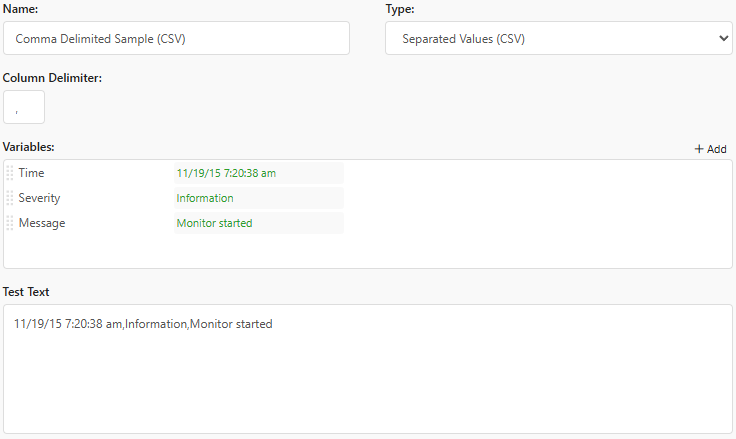
Comma Separated Values
This is the simplest parsing format.
- Variable names describe each column
- The default separator is a comma
Key Value Pairs
This format parses text encoded as key value pairs separated by two delimiters.
Example:
from:John;val:10
Configuration:
- Pair Separator: ;
- Value Separator: :
INI-like Encoding Example
speed = 10
acceleration = 0
Configuration:
- Pair Separator: \n
- Value Separator: =
Regular Expression
Regular expressions allow advanced pattern matching.
- NetCrunch uses JavaScript-compatible regular expressions
- Variables are matched by the order of capturing groups
Example – Log4J Log Format
Pattern:
(\d{4}-\d{2}-\d{2}) (\d{2}:\d{2}:\d{2},\d{3}) (.∗?)(.∗?) ([^ ]) +([^ ]) - (.*)$
Mapped variables: - Date - Time - Thread - Severity - Module - Message
Apache Common Log Format
This parser decodes Apache logs using the Common Log Format.
You only need to provide the format string used in the Apache configuration.
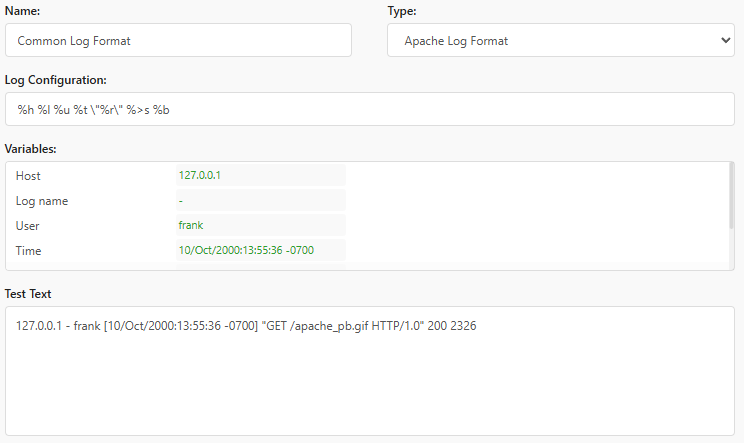
Refer to Apache documentation:
https://httpd.apache.org/docs/2.4/logs.html#common
XPath and DOM Selectors
Text Parsers support XML extraction using XPath.
Only paths returning single values are supported.
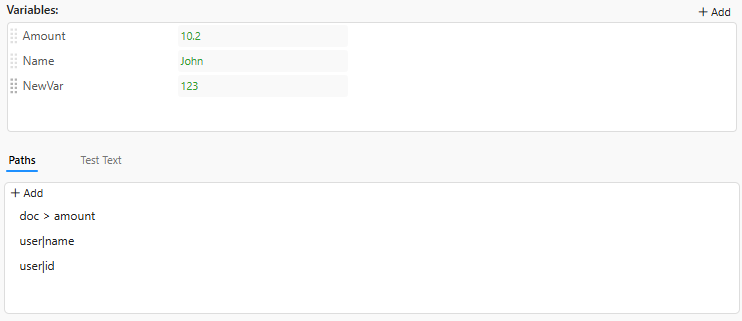
Example XML
<doc>
    <amount>10.2</amount>
    <user name="John" id="123"/>
</doc>
Extractable paths:
- /doc/amount
- //user/@name
- //user/@id
Conditional Selectors
You can select nodes conditionally:
/doc/user[@id='123']/@name
DOM Selectors
XPath expressions also support DOM (CSS-like) selectors.
To extract attributes, NetCrunch extends CSS syntax using the | character.
Equivalent selectors:
- doc > amount
- user|name
- user|id
JSON Path
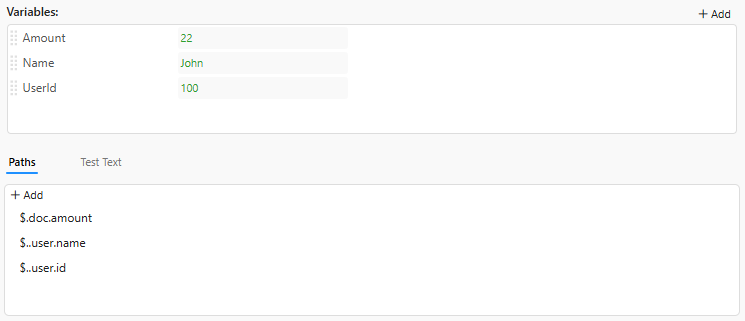
Text Parsers support JSON Path expressions.
Only paths returning single values are supported.
Example JSON
{
  "doc": {
    "amount": 22,
    "user": {
      "name": "John",
      "id": 100
    }
  }
}
Extractable paths:
- $.doc.amount
- $..user.name
- $..user.id
JavaScript Parser
JavaScript provides full flexibility for text parsing.
- Uses a sandboxed NodeJS (V8) engine
- Executes in strict mode
- Automatically terminated on timeout
Input
The input text is available in the text variable.
Output
The script must assign an object to the result variable.
Its properties must match declared parser variables.
Example
Test Text
{
  "probe_1": {
    "temp": 10
  }
}
Variables
- Temperature
Script
// Parse input data const data = JSON.parse(text);// Assign parser output result = { temperature: data.probe_1.temp };
Python Parser
Python parsers allow custom parsing logic using Python 3.7.
- No external modules can be loaded
- Built-in support for JSON and XML parsing is provided
Input
The input text is available in the text variable.
Output
The script must populate the result dictionary with declared variables.
Example
Test Text
{
  "probe_1": {
    "temp": 10
  }
}
Variables
- Temperature
Script
data = json.loads(text)result['temperature'] = data['probe_1']['temp']