Monitoring SNMP Devices
NetCrunch provides complete SNMP monitoring, including support for v3, traps, and MIB compiler.
SNMP was developed on UNIX back in 1988 - so it's a pretty mature technology now. Despite various new protocols, it's probably the most widely implemented management protocol today. SNMP is defined in RFC (Request For Comments) by IETF (Internet Engineering Task Force) and is used everywhere: servers, workstations, routers, firewalls, switches, hubs, printers, IP phones, appliances...
SNMP Versions
Today, most devices support SNMPv2c. There are available agents for operating systems, but they can be a security loophole if they don't use SNMPv3. On the other hand, network virtualization helps separate traffic so that VLANs can separate older SNMP devices.
Top hardware devices usually support SNMP v3, which adds more security to the protocol (authentication and encryption). NetCrunch supports all SNMP versions: SNMP v1, SNMP v2c, and SNMPv3, including decoding traps. NetCrunch SNMP implementation supports SNMPv3 following encryption algorithms: DES, 3DES, AES 128, AES 192 and AES 256.
Please note that SNMPv3 is more expensive in processing power (because of encryption) on both sides - the device and SNMP manager application.
To avoid device overload, we recommend limit pending SNMP requests in SNMP Settings ( icon in SNMP section) on any nodes that use SNMP.
SNMP Profiles
NetCrunch uses SNMP profiles to manage communities and passwords for SNMP. The profiles allow you to use the same SNMP security settings for multiple nodes. SNMP Profiles encapsulate settings necessary to communicate with the particular SNMP Agent.
Profiles define the SNMP protocol version and information related to protocol version and security settings: the community string (SNMPv2); or authentication user, password, and encryption to be used (SNMPv3).
Additionally, the profile allows specifying different protocols for reading and writing operations. For example, you can set up reading operations to use SNMPv2 and disable writing.
To receive and decode SNMPv3 traps, you need to define a separate SNMPv3 Traps & Trap Info profile.
Because SNMPv2 is much more efficient (it allows asking for multiple values at once), we recommend using SNMPv2 for monitoring.
Monitoring SNMP Variables
To access SNMP data on a particular node, you must make it SNMP enabled by Node SettingsMonitoringSNMP. To create an alert on the SNMP counter value, you need to set up a Performance Trigger alert.
Setting Alerts on Numerical Values
Select the node, open Node SettingsMonitoring, and you'll see the SNMP section grayed out. Please enable it. NetCrunch will use the default profile. Set the proper profile in SNMP monitor settings.
Now you can click on the Custom monitoring pack, add New Event for SNMP Performance Counter, choose one of Event Triggers for Counters, and select the SNMP variable as the counter.
We have the following options for SNMP counters:
- Enter OID
- This option allows you to enter an arbitrary OID number - you might obtain it just from the device using a simple MIB walker tool. Using OID allows accessing SNMP data even if you do not have the MIB for the device.
- Select from MIB
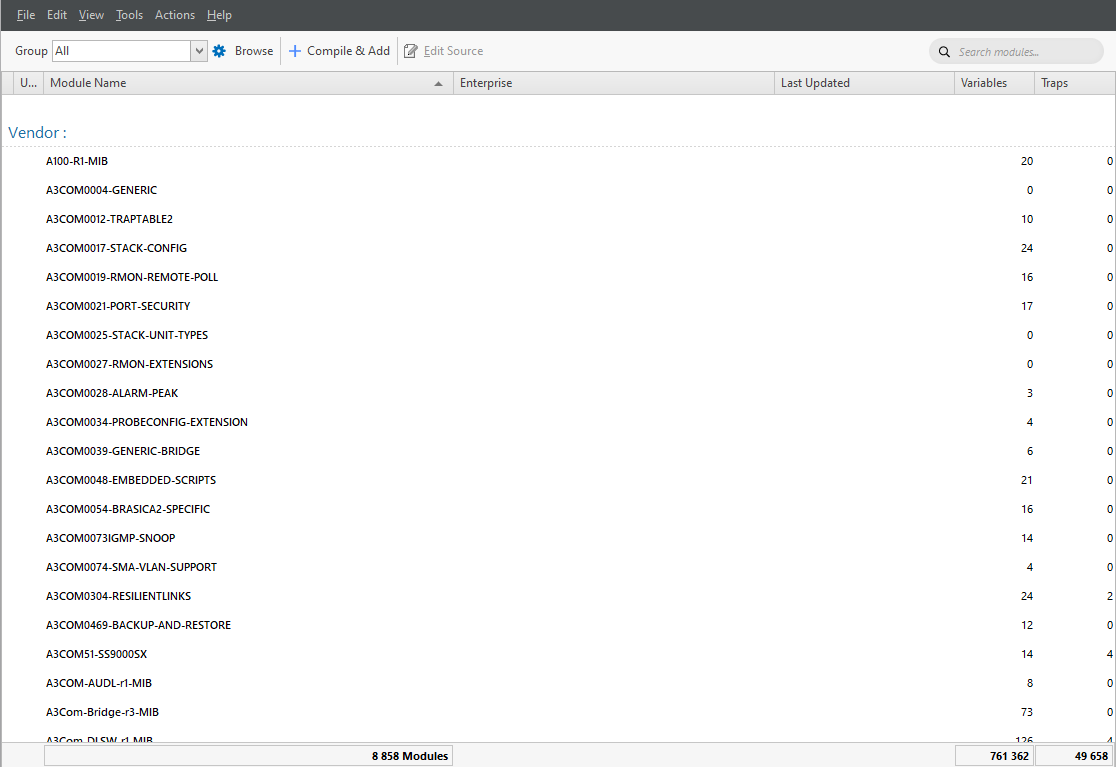
- To select an SNMP variable, you can browse SNMP MIB data. This method requires first importing and compiling MIB data into the NetCrunch MIB database. NetCrunch includes a database of 8700 popular MIBs. There are also websites maintaining their own set of MIBs. You can download them and use the NetCrunch MIB compiler to extend your MIB database.
- Predefined Counter
- This option is about choosing from predefined SNMP counters - these are some standard counters used. You can extend this list for later use to avoid tedious MIB tree browsing.
Setting Alerts on Text Values
Besides numerical values, you can also monitor text values returned by the SNMP agent. To do this, you have to select <New Event for SNMP Variable Value> and enter OID or select the object from the MIB database. Then you can check the following conditions:
- Value equals to given value
- Value not equals to given value
- Value contains given value
- Value does not contains given value
- Value matches regular expression
- Value does not match regular expression
- Value changed
- Value unchanged
Creating of Monitoring Pack for SNMP
Settings Alerting & Notifications Monitoring Packs and Policies
Select SNMP only from the restrictions drop-down menu when creating a new monitoring pack.
SNMP Views
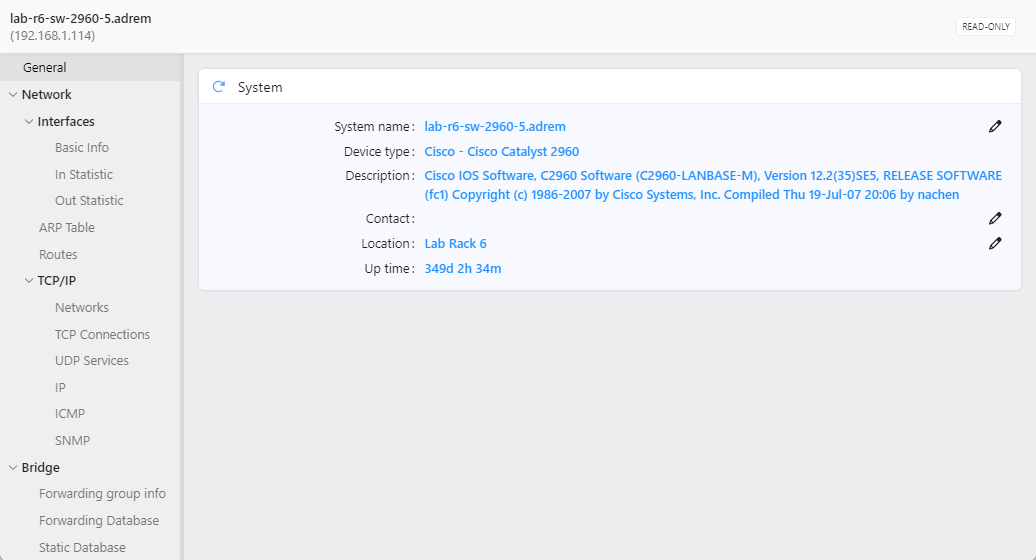
SNMP only describes the variables and get/set operations, so browsing the OID MIB tree is somewhat tricky. SNMP tables often refer to other tables and raw data is not readable.
NetCrunch SNMP Views allow for creating tables and forms that are more human-readable, allowing reading and entering SNMP data.
Additionally, views are automatically managed according to device type and supported MIB.
Receiving SNMP Traps
Check if the SNMP trap listener is enabled. Settings Monitoring SNMP Trap Receiver
Node SettingsMonitoring or Settings Alerting & Notifications Monitoring Packs and Policies
NetCrunch allows receiving SNMPv1 traps, SNMPv2c, and SNMPv3, including encryption. To turn a trap into an alert, you must define an alert on the node sending the SNMP trap message.
NetCrunch receives all traps and puts them in the External Events window. You can add the necessary node and trap with one click in this window, even if the node didn't exist in the atlas before.
To receive SNMPv3 traps, you need to define SNMPv3 Traps & Trap Info first. Otherwise, the program won't be able to decode trap data.
The profile also contains the field for 'Remote SNMP Engine Id,` which you have to set according to the SNMPv3 trap specification ([see RFC2570](http://www.ietf.org/rfc/rfc2570.txt)).
Read more in Receiving SNMPv3 Notifications
Forwarding SNMP Traps
Settings Monitoring SNMP Trap Receiver
After receiving an SNMP trap, NetCrunch can forward it "as is" to another SNMP manager.
MIB Compiler
NetCrunch MIB compiler allows you to extend the NetCrunch MIB database used to select SNMP traps and variables during configuration and resolve OID to names for incoming SNMP data (traps).
It's an advanced multi-pass compiler that can set up module name aliases to compile otherwise incompatible modules.