
License Management
License installation options described.
Installing
Help Install Program License
NetCrunch allows the license to be installed online straight from the program UI. When you purchase the product, the license is assigned to your account. If never logged into account.adremsoft.com, then you have to reset your password first.
After selecting the license from the list of available licenses, the license is installed on the NetCrunch Server and automatically activated.
Installing License without an Internet connection
It takes another step before you go to the customer portal. So select Install From License File, and then the window shows the activation code you need to copy and use to generate the file on the portal.
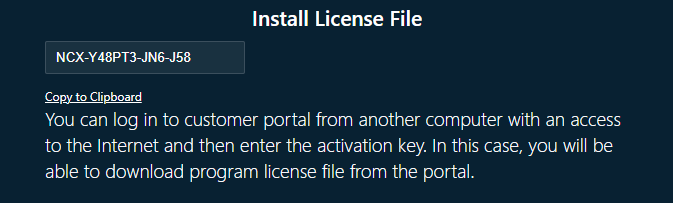
You can download the file and put it on the NetCrunch Server machine, which generated the activation code. This process must be repeated every time license gets updated, for example, when you add more nodes or features or a new maintenance expiration date.
Moving License to Another Machine
Before you decide to move NetCrunch to another machine, you need to deactivate your license. You can do it on NetCrunch Server by running NCLicenseManager located in the program installation folder.
License Manager
The program allows for installation, deactivation, or updating license.
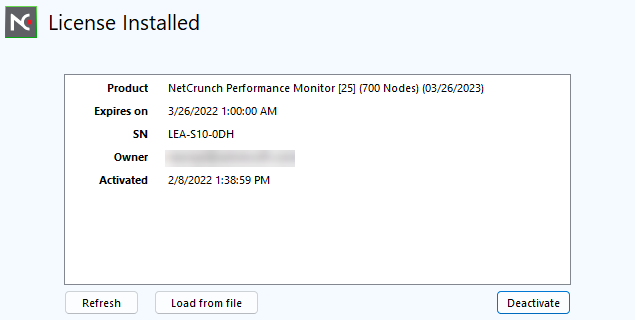
You can deactivate the license online, which requires login to the customer portal from the license manager program. You can also use the numeric deactivation code to deactivate the license on the customer portal.
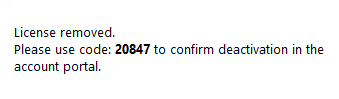
After the license is deactivated server restarts automatically.
Refreshing the License
(hamburger menu)Help Refresh Program License
You can refresh the license from the console or NCLicenseManager program on the server. You need to refresh the license when its properties change (expiration date, new modules, or additional elements).
If a refreshed license contains new features or modules to be enabled, the NetCrunch Server will restart automatically.