
Preventing False Alarms
Learn what situations increase alerts' volume and how NetCrunch helps prevent false alarms.
False alarms can arise in many situations. Here are some typical examples of events which can generate false alarms:
- When an intermediate device fails, all events and devices depending on this device tend to cause false alarms.
- Too sensitive Counter Event Triggers - you are alerted on momentary value change.
- Too sensitive Network Service monitoring: You are alerted when one or two packets are dropped or a single connection is lost.
- Slow responding SNMP devices - sometimes heavily loaded SNMP devices tend to respond with a long delay.
NetCrunch helps you avoid alert overload by implementing the following functionalities:
Prioritized Monitoring
The order and frequency of monitoring nodes depend on the priority; intermediate nodes have a higher priority than nodes connected through them.
Event Suppression
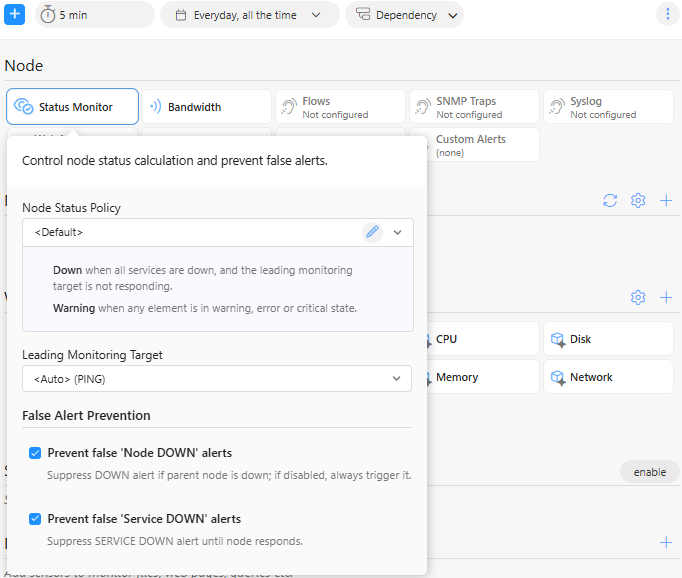
Event Suppression is the technique of preventing false alarms caused by network intermediate connection failure.
When NetCrunch receives an event related to a node connected through the intermediate link, it first ensures the link is OK so a broken intermediate connection does not cause the event. You can define exceptions when you want to receive an event from descendant nodes.
Additionally, NetCrunch can suppress alerts from various node services or sensors. Event suppression is enabled by default. You can disable it by clicking the icon next to network services or in a particular sensor settings window.
Configuration Tips
Fix Counter Event Triggers
When a counter value changes, you should set a trigger on the average value instead of the actual one. You can also define hysteresis by adding a reset threshold to the trigger.
Read more about Event Triggers for Counters.
Fix Network Service Monitoring Parameters
Usually, NetCrunch sends multiple requests in a row to check network service response. To ensure the service responds, increase the service's timeout or set an additional repeat count.
Fix SNMP Monitoring Engine settings
SNMP works over the UDP protocol, which is not reliable, as packets can be lost. In such a case, the program waits a given time, and when it does not get a response, it repeats the request.
Because of the nature of UDP communication, the program can't recognize whether the packet is lost or the device is bus,ywhichd delays the response.
Go to Node SettingsSNMP and increase SNMP timeout for busy devices or SNMP retry count for unreliable connections.