
Sending Data to NetCrunch
Read how to send data to NetCrunch and create a custom monitor. You can easily turn any application or script into a NetCrunch agent.
Data Receiver Sensor
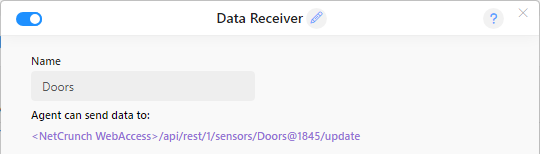
You can add the Data Receiver Sensor from the sensor list on any node. The configuration here is very minimal. It needs a name, and it automatically creates an API key for an external agent expected to send data to NetCrunch. The API key consists of the sensor name (without spaces) and node id number. For example, an API key can be JMX@1034, if we name our agent "JMX."
You can add multiple sensors on a single node for each application you need to monitor.
Data Format
The sensor can process data in various formats using specific data parsers. By default, it uses native NetCrunch JSON format, but you can easily create a custom parser.
Retention Time
Because NetCrunch does not know how often you will send data to it, you need to specify a "retention time" for data, after which it will expire and be cleared out of memory.
REST API
We wanted to keep the API for the sensor straightforward. The simplest tool you can use to send requests to NetCrunch is cUrl open source project, available for almost any platform. You can find it at curl.haxx.se
The API consists of only 5 requests:
Authentication
A sensor can require a bearer token. Set one in the Bearer Token field on the sensor form,
and every request must then present it in the Authorization header:
Authorization: Bearer <token>
The token is scoped to that one sensor, so a token taken from one application's configuration can write to that application's sensor and nothing else.
Leave the field empty and nothing changes. Existing receivers keep working exactly as before, and requests are accepted without a header. That is the supported way to keep an integration running while you decide whether to add a token to it.
When no token is set, the endpoint URL is the only thing protecting the sensor - anyone who can reach the web server and knows the sensor name and node id can write to it. Treat the URL as a secret in that case, and keep it out of logs and scripts you share.
Example
 curl -X POST <nc-server-address>/api/rest/1/sensors/<api-key>/update \
   -H "Content-Type: application/json" \
   -H "Authorization: Bearer <token>" \
   -d '{"counters": {"Queue/Depth": 12}}'
The token is typed or pasted by the operator. NetCrunch does not generate one for you.
Update
POST /api/rest/1/sensors/<api-key>/update
By default, sensor expects <NetCrunch JSON> data format. So, the request payload should be application/json content type
Example
 {
    "retain": 1,
    "counters": {
        "PBX/line status.0" : 1,
        "PBX/line status.1" : 0
     },
     "statuses":  {
       "AC"  : "On",
       "Power": "On"
     }
 }
As you can see, you can send multiple statuses and counters in a single request.
Status Objects
Beside simple status values (key, value pairs), NetCrunch allows tracking of status objects. The status object can be described by the JSON object and can contain additional user data.
For example:
 {
      "statuses" :  {
           "Disk C:" : {
                          "value" : "ok",
                          "message" : "Working fine",
                          "retain" : 5,
                          "critical": true,
                          "data" : {
                             "type" : "SDD",
                             "upTimeSec" : 123431
                          }
           }
       }
    }
The status object can contain fields such as:
-
value - a status value that can be any string, but if one of the standard values is used, NetCrunch will use the value for calculation alert conditions. The field is required to recognize the status object, otherwise, the whole object will be treated as a text string. Standard values are: ok, error, warning, disabled, unknown.
-
name - the name of the object, it does not have to be unique. (optional)
- message - this can be a message describing the state (for example, error message). (optional)
- received - a time when the status has been read. (optional)
-
retain - how long status will be valid if no new status is received after this status becomes unknown. The time is in minutes.
-
data - custom data. It can be any JSON object, except if class points to one of the well-known classes, it must conform to the class data format.
- critical - when
truethe sensor status will reflect highest status of a given object
Sensor Status Calculation
When your object contains the "Critical" field, it will influence whole sensor status; otherwise, sensor status is based on active alerts state.
Any object set to "critical": true will set sensor status to the highest alert level (error or warning). If the object is non-critical ("critical": false), then the sensor is in error state only if all objects are in error state, and it is in warning state when any of its objects are in error or warning state.
Counter
GET /api/rest/1/sensors/<api-key>/counter?<parameter-list>
Example
<nc-server-address>/api/rest/1/sensors/<api-key>/counter?Temp=65&Wind=4&@retain=5
Counter/inc Counter/dec
As NetCrunch stores counter values in memory, the agent can increment it without storing its actual value. The request will increase or decrease the counter by the given value.
Example
<nc-server-addres>/api/rest/1/sensors/<api-key>/counter/inc?Door.Opened=1
Status
GET /api/rest/1/sensors/<api-key>/status?<parameter-list>
Example
<nc-server-address>/api/rest/1/sensors/<api-key>/status?Door=Opened&@retain=5
Response Codes
The sensor reports the outcome in the HTTP status code.
| Code | Meaning | What to do |
|---|---|---|
| 200 | Data accepted | Nothing. |
| 400 | Malformed data, or a shared URL request with no node identification | Fix the payload. Retrying will not help. |
| 401 | Token missing or incorrect | Fix the configuration. Retrying will not help. |
| 404 | No sensor matches the name or key in the URL | Check the API key. Usually a typo. |
| 503 | Relay timed out, or the server is not connected | Retry. The data was valid and the destination was temporarily unreachable. |
Only 503 is worth retrying. Because /update carries absolute values rather than increments,
re-sending the same payload cannot double-count anything, so a retry is always safe.
Changed in NetCrunch 16. Earlier versions answered 200 to every request and reported failures only in the response body. A mistyped sensor name therefore looked like a successful send while the data was silently discarded. Any script or integration that checks only for 200 will now start reporting errors it was previously ignoring - that is the mistake becoming visible, not a new failure.
Client Libraries
The requests above can be built by hand, but for an application reporting its own state the NetCrunch Telemetry SDK does it for you, in PowerShell, Node.js, Python, Go and .NET. It stages values in memory and sends them as one payload, with retries. See NetCrunch Telemetry SDK.
Sending data to multiple nodes - shared URLs
By default, the data URL is pointing to a single sensor on a single node, but if you want to supply data to multiple nodes, you can use a shared URL. To do this, check Use the shared URL option in the sensor configuration.
Now your data should be in the form of a JSON array, and each sensor object has to contain node identification, which is node DNS name or IP address depending on node Identification Type.
For example:
Example
[
 {
    "node": "192.168.10.1"
     "statuses":  {
       "AC"  : "On",
       "Power": "On"
     }
 } ,
 {
    "node": "test.lab"
     "statuses":  {
       "AC"  : "Off",
       "Power": "Off"
     }
 }
 ]
Web Messages
You can easily send event messages to NetCrunch using an HTTP request. The program accepts POST and GET requests.
Service URL
http://<nc-server>/api/rest/1/event/<node-identification>
Node identification is a node IP address or DNS name.
Find more information below.